Advertisement
When you're dealing with enormous volumes of data—think terabytes and beyond—you can't rely on the old, familiar ways of saving and accessing files. What worked for your vacation photos or spreadsheets won't suffice when your data grows from gigabytes to something that can't fit on a single machine. That's where HDFS, or Hadoop Distributed File System, comes in. It's designed to do one thing very well: store large files across many machines while making sure those files stay accessible, safe, and ready to use.
So, let’s have a closer look at what makes HDFS such a dependable system when it comes to storing big data.
At its core, HDFS isn’t as complicated as it might sound. It’s a distributed file system, which means that instead of putting all your files on one computer, it breaks them into blocks and spreads them out across several computers. Each file is split into fixed-size pieces (typically 128MB or 256MB), and these blocks are stored in multiple places. This way, even if one machine goes down—which is pretty common when you’re working with hundreds or thousands of nodes—your data doesn’t disappear.
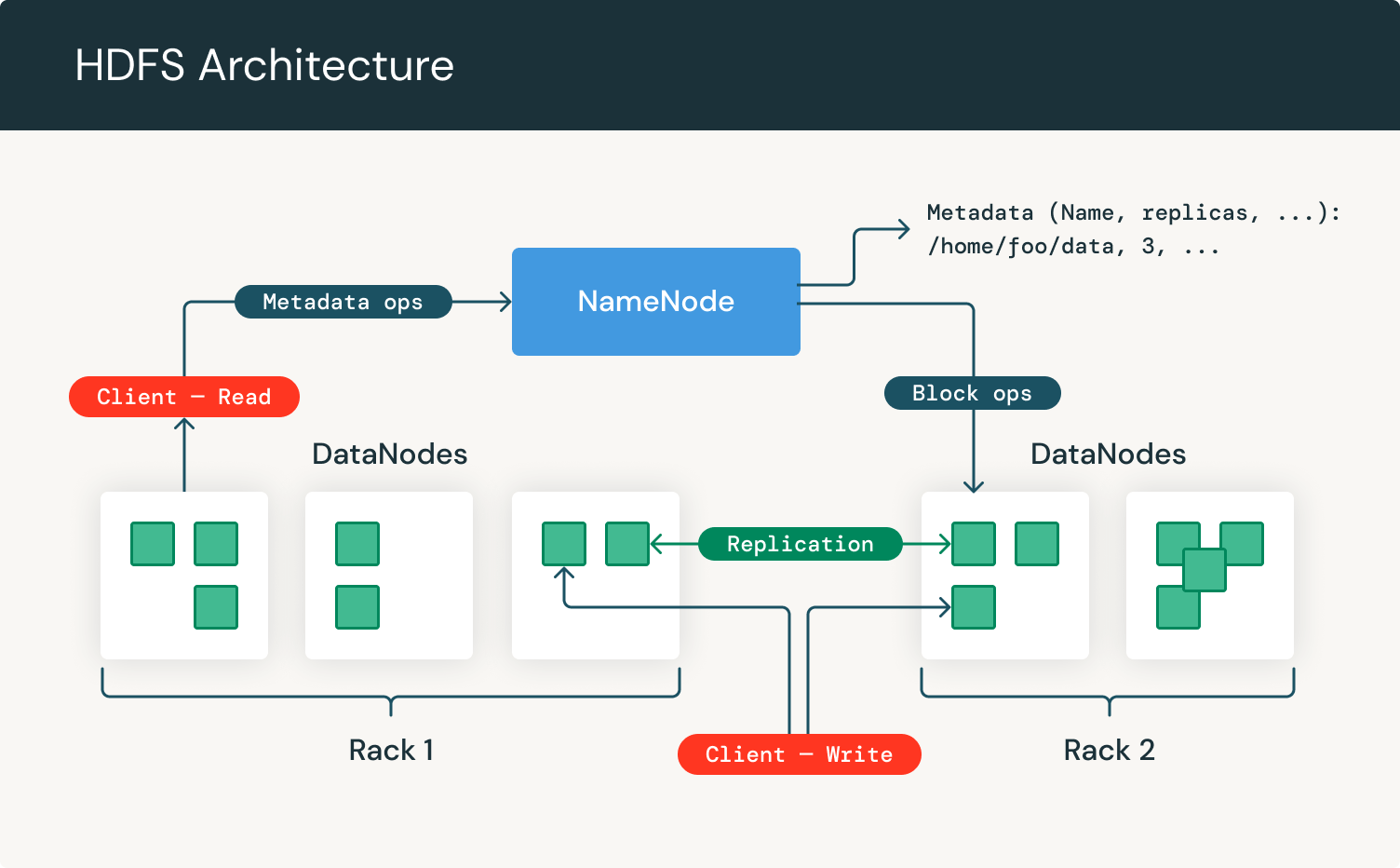
Understanding how HDFS works means knowing what's going on behind the scenes. There are two primary components involved: the NameNode and the DataNode. Each one has a specific role, and together they form the backbone of the system.
Think of the NameNode as the index in a book. It doesn’t store the actual content, but it tells you where to find it. The NameNode keeps track of all the metadata—what files exist, where each block is located, and how everything fits together. When you want to read or write a file, the NameNode gives directions. It knows where each piece of your data lives, and it keeps the whole system organized.
It’s worth noting that the NameNode is critical. If it goes down, the file system can’t function. That’s why newer versions of Hadoop allow you to run a standby NameNode, so there's a backup plan in place.
While the NameNode keeps things in order, the DataNodes do the heavy lifting. They store the actual data blocks. Each DataNode is responsible for managing the blocks on its local disk, sending regular check-ins (called heartbeats) to the NameNode, and performing any read/write tasks as instructed. If one goes offline, the system doesn’t panic—it simply pulls the data from other replicas and keeps going.
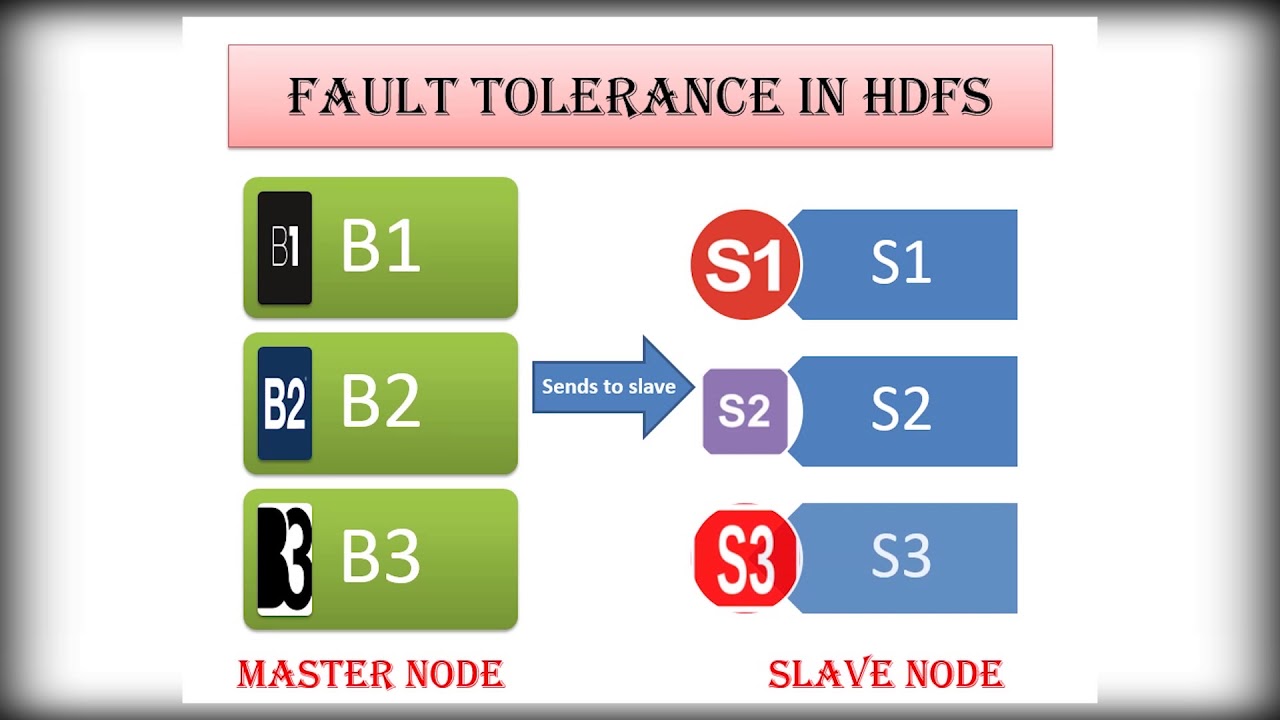
This setup makes HDFS incredibly fault-tolerant. Since every block is replicated (usually three times), losing a machine or two doesn’t mean losing your data. The system is built to handle it quietly in the background.
So, what actually happens when you save or open a file with HDFS? The process is built around efficiency and scale. Let’s break it down.
When a user or application wants to store a file, the client first contacts the NameNode. The NameNode checks if there’s enough space across the DataNodes and then breaks the file into blocks. It assigns each block to different DataNodes—always making sure to keep copies on separate machines, sometimes even across racks, to improve fault tolerance.
The client then writes the file block by block directly to the chosen DataNodes. This way, the NameNode doesn’t get overloaded with traffic. Once all blocks are written, the file is considered stored.
Reading is just as streamlined. The client again contacts the NameNode to get the list of DataNodes that hold the blocks. It then goes directly to the DataNodes and reads each block in sequence. If a block can't be read from one node, it simply tries another replica. The system is designed to be fast and resilient, perfect for large-scale analytics where speed and reliability matter.
HDFS shines in environments where scale and reliability are essential. But it’s not just about storing data—it’s about doing so in a way that stays manageable no matter how much your data grows.
Rather than upgrading to bigger, more expensive machines, HDFS allows you to add more nodes to the system. This is known as horizontal scaling. It’s much more practical and budget-friendly, especially when you're working with datasets that keep expanding by the hour. Whether you’re adding ten nodes or a hundred, HDFS can keep up without skipping a beat.
Failures happen. Disks crash, machines go offline, and power blips knock out entire racks. HDFS doesn't just survive this kind of chaos—it's designed for it. With replication in place, your data stays safe even if several nodes fail. And the best part? Recovery happens automatically. The NameNode detects when a block is under-replicated and initiates a copy to restore the ideal count.
HDFS is optimized for reading large files from start to finish. It’s not built for quick edits or updates to small sections of a file. If you need fast, random access to specific data, HDFS might not be the best fit. But if you’re analyzing logs, crunching numbers, or training machine learning models, this approach makes perfect sense.
Big data isn’t just about having more information—it’s about handling that information without losing control. HDFS offers a reliable, fault-tolerant, and scalable way to store data across many machines, all while keeping things relatively simple. It may not care about the elegance of your folder names or whether your blocks are spread perfectly evenly, but it does what it promises: keeps your data available, safe, and ready when you need it.
Whether you're working on a data lake, building an analytics platform, or managing large-scale logs, HDFS is a practical choice that just works—quietly, efficiently, and without demanding too much from you.
Advertisement

Confused about the difference between a data lake and a data warehouse? Discover how they compare, where each shines, and how to choose the right one for your team

How Hugging Face for Education makes AI accessible through user-friendly machine learning models, helping students and teachers explore natural language processing in AI education

Explore how data quality impacts machine learning outcomes. Learn to assess accuracy, consistency, completeness, and timeliness—and why clean data leads to better, more stable models

How fine-tuning CLIP with satellite data improves its performance in interpreting remote sensing images and captions for tasks like land use mapping and disaster monitoring

Looking for practical data science tools? Explore ten standout GitHub repositories—from algorithms and frameworks to real-world projects—that help you build, learn, and grow faster in ML

Curious why developers are switching from Solidity to Vyper? Learn how Vyper simplifies smart contract development by focusing on safety, predictability, and auditability—plus how to set it up locally

A detailed look at training CodeParrot from scratch, including dataset selection, model architecture, and its role as a Python-focused code generation model

Discover lesser-known Pandas functions that can improve your data manipulation skills in 2025, from query() for cleaner filtering to explode() for flattening lists in columns
Curious how stacking boosts model performance? Learn how diverse algorithms work together in layered combinations to improve accuracy—and why stacking goes beyond typical ensemble methods

Explore how Neo4j uses graph structures to efficiently model relationships in social networks, fraud detection, recommendation systems, and IT operations—plus a practical setup guide

Confused about MLOps? Learn how MLflow makes machine learning deployment, versioning, and collaboration easier with real-world workflows for tracking, packaging, and serving models

Curious about how to start your first machine learning project? This beginner-friendly guide walks you through choosing a topic, preparing data, selecting a model, and testing your results in plain language